

Building a Real-Time Solana Wallet Tracker
Tired of chasing Solana transactions and always being behind? Fret no more. Let's build a wallet tracker using OrbitFlare's Jetstream that filters and streams transactions in real-time, decodes PumpFun trades and fires alerts based on activity that you add in the config.
Sourav Mishra · Solutions Engineer
Feb 2, 2026 • 12 min read


Building a Real-Time Solana Wallet Tracker
Polling RPC nodes for transaction data is a losing game. You query, wait, get results and by then fifty more transactions have already hit the chain. If you're tracking wallets or watching DEX activity, you're always playing catch-up.
Streaming fixes this. One connection, live data, transactions pushed to you as they land on-chain. Jetstream is OrbitFlare's gRPC service for exactly this - sub-second latency with server-side filtering, so you're not drowning in irrelevant noise.
This tutorial builds a wallet tracker in Rust that decodes PumpFun trades, tracks stats, and fires alerts when something interesting happens. It handles thousands of TPS without breaking a sweat (your laptop might, though).
What is Jetstream?
OrbitFlare's Jetstream is a gRPC streaming service for Solana. Instead of hammering RPC endpoints repeatedly(please don't), you open one connection and receive transaction updates as they happen on-chain.
The key feature is server-side filtering. Specify which accounts or programs matter (PumpFun, Raydium, etc.), and Jetstream only sends those transactions. Everything else gets filtered before hitting your network, saving massive bandwidth.
Your wallet tracker monitors specific programs or wallets, meaning it should only receive relevant transactions instead of dumping every transaction on Solana, almost all of which you discard locally.
Architecture
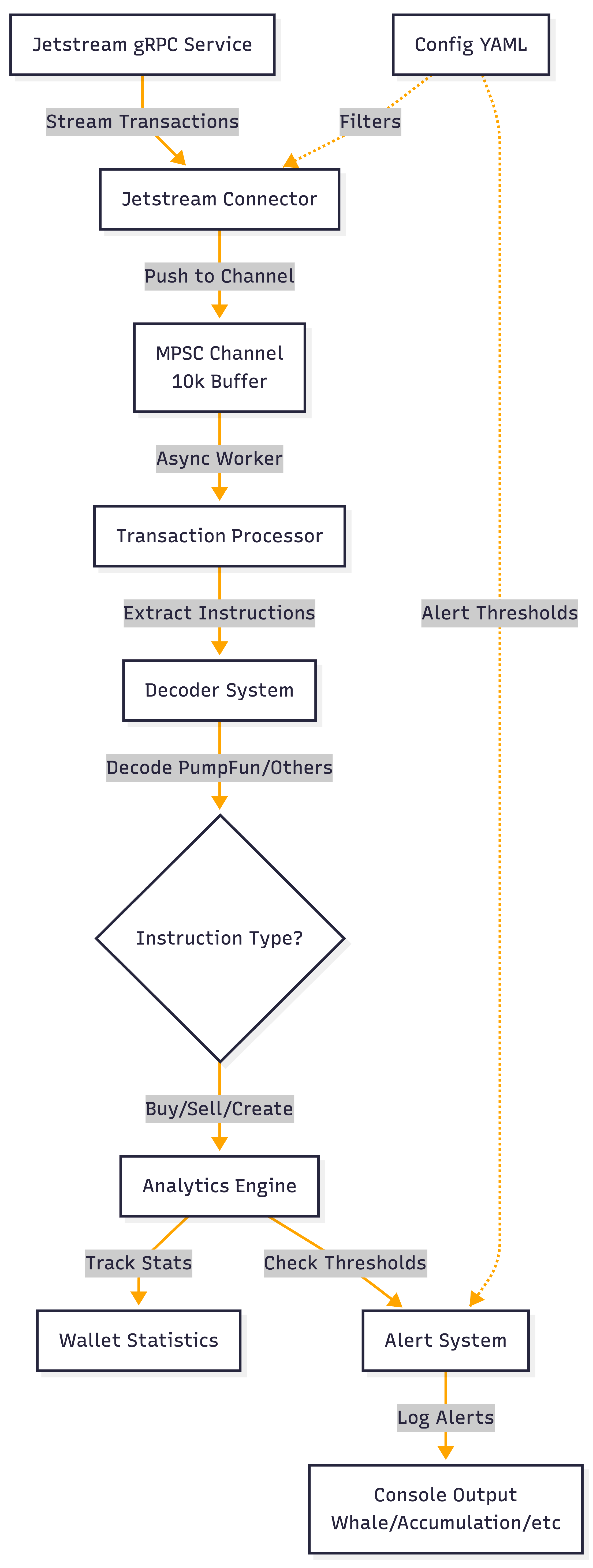
The tracker can be stripped down to four components:
- Jetstream Connector - Establishes gRPC connection
- Transaction Processor - Parses transactions
- Decoder System - Interprets program-specific instruction data and decodes them (PumpFun, etc.)
- Analytics Engine - Tracks wallet stats, detects patterns, fires alerts
Project Setup
Get your Jetstream configured by signing up at OrbitFlare.
A Jetstream URL looks like this - http://jp.jetstream.orbitflare.com
We will be using 2 crates in our workspace. One is to handle all the jetstream protobuf shenanigans and another is the wallet tracker app itself
mkdir solana-wallet-tracker && cd solana-wallet-trackerCreate Cargo.toml:
[workspace]
members = ["jetstream_protos", "wallet-tracker"]
resolver = "2"

[workspace.package]
version = "0.1.0"
edition = "2021"

[workspace.dependencies]
anyhow = "1.0.100"
tokio = { version = "1.49.0", features = ["full"] }
tokio-stream = "0.1.18"
tonic = "0.14.3"
prost = "0.14.3"
solana-sdk = "3"
bs58 = "0.5.1"
log = "0.4.29"
env_logger = "0.11.8"
clap = { version = "4.5.56", features = ["derive", "env"] }
serde = { version = "1.0.228", features = ["derive"] }
serde_json = "1.0.149"
serde_yaml = "0.9.34"
jetstream_protos = { path = "./jetstream_protos" }
The protobuf crate auto-generates Rust types from Jetstream's .proto file at build time.
Configuration
Everything that's configurable can be configured in the YAML config - filters, alert thresholds, logging levels. Adjust the config and see new results without recompiling.
jetstream:
  url: "http://jp.jetstream.orbitflare.com"
  channel_buffer_size: 10000

filters:
  pumpfun-all:
    account_required:
      - "6EF8rrecthR5Dkzon8Nwu78hRvfCKubJ14M5uBEwF6P"

alerts:
  trade_size:
    whale_trade_threshold_sol: 100.0
  wallet_behavior:
    consecutive_buys_threshold: 3
Serde translates this into Rust by deserializing the config into structs.
Connecting to Jetstream
The connector establishes a gRPC channel with TCP keepalive and timeout settings, then subscribes with transaction filters:
let channel = Channel::from_shared(url)?
    .timeout(Duration::from_secs(30))
    .tcp_keepalive(Some(Duration::from_secs(60)))
    .connect()
    .await?;

let mut client = JetstreamClient::new(channel);

let request = SubscribeRequest {
    transactions: filters,
    accounts: HashMap::new(),
    ping: Some(SubscribeRequestPing { id: 1 }),
};

let response = client.subscribe(tokio_stream::iter(vec![request])).await?;
let mut stream = response.into_inner();
The subscription is bidirectional - you can send filter updates later, and Jetstream responds with a stream of transaction updates.
Processing the Stream
The main loop receives transactions and sends them to a processor via a channel. This decouples network I/O from processing logic:
let (tx, mut rx) = tokio::sync::mpsc::channel(10_000);

// Spawn processor
tokio::spawn(async move {
    while let Some(tx_info) = rx.recv().await {
        processor.process(tx_info).await;
    }
});

// Main loop
while let Some(response) = stream.next().await {
    match response {
        Ok(msg) => {
            if let Some(tx_info) = extract_transaction(msg) {
                let _ = tx.try_send(tx_info);
            }
        }
        Err(e) => log::error!("Stream error: {}", e),
    }
}
The 10k buffer prevents dropped transactions during processing spikes. When processing falls behind, transactions queue in the channel instead of being lost at the network layer.
Decoding Instructions
Solana instructions are raw bytes. Programs identify instructions using discriminators - the first 8 bytes of instruction data. This project has a very limited PumpFun instructions decoder as an example. You can write other decoders based on what you are tracking.
For PumpFun trades:
const BUY_DISC: [u8; 8] = [102, 6, 61, 18, 1, 218, 235, 234];
const SELL_DISC: [u8; 8] = [51, 230, 133, 164, 1, 127, 131, 173];

pub fn decode_pumpfun(accounts: &[Pubkey], data: &[u8]) -> Option<String> {
    if data.len() < 24 { return None; }

    match &data[..8] {
        BUY_DISC => {
            let amount = u64::from_le_bytes(data[8..16].try_into().ok()?);
            let max_sol = u64::from_le_bytes(data[16..24].try_into().ok()?);
            let sol_amount = max_sol as f64 / 1e9;
            Some(format!("Buy {} tokens (max {} SOL)", amount, sol_amount))
        }
        SELL_DISC => {
            let amount = u64::from_le_bytes(data[8..16].try_into().ok()?);
            let min_sol = u64::from_le_bytes(data[16..24].try_into().ok()?);
            let sol_amount = min_sol as f64 / 1e9;
            Some(format!("Sell {} tokens (min {} SOL)", amount, sol_amount))
        }
        _ => None,
    }
}
Tracking Wallet Statistics
Wallet statistics are stored in a thread-safe HashMap:
pub struct WalletStats {
    wallets: RwLock<HashMap<String, WalletTradeStats>>,
    max_wallets: usize,
}

pub struct WalletTradeStats {
    pub total_buys: u64,
    pub total_sells: u64,
    pub total_buy_volume_sol: f64,
    pub total_sell_volume_sol: f64,
    pub largest_buy_sol: f64,
    pub largest_sell_sol: f64,
    pub consecutive_buys: u64,
    pub consecutive_sells: u64,
}
RwLock allows concurrent reads and exclusive writes. When recording a trade:
pub fn record_trade(&self, wallet: String, decoded: &str) {
    let mut wallets = self.wallets.write().unwrap();
    let stats = wallets.entry(wallet).or_insert_with(Default::default);

    if decoded.contains("Buy") {
        stats.total_buys += 1;
        stats.consecutive_buys += 1;
        stats.consecutive_sells = 0;

        if let Some(sol_amount) = extract_sol_amount(decoded) {
            stats.total_buy_volume_sol += sol_amount;
            if sol_amount > stats.largest_buy_sol {
                stats.largest_buy_sol = sol_amount;
            }
        }
    } else if decoded.contains("Sell") {
        stats.total_sells += 1;
        stats.consecutive_sells += 1;
        stats.consecutive_buys = 0;

        if let Some(sol_amount) = extract_sol_amount(decoded) {
            stats.total_sell_volume_sol += sol_amount;
            if sol_amount > stats.largest_sell_sol {
                stats.largest_sell_sol = sol_amount;
            }
        }
    }
}

fn extract_sol_amount(decoded: &str) -> Option<f64> {
    let parts: Vec<&str> = decoded.split("SOL)").collect();
    if parts.is_empty() {
        return None;
    }
    let amount_str = parts[0].split_whitespace().last()?;
    amount_str.parse::<f64>().ok()
}
The sell counter resets when you buy and vice-versa. This detects accumulation and distribution patterns. Multiple consecutive buys would mean the wallet is loading up, and multiple consecutive sells would mean they are diluting.
Alert System
Each trade is checked against the alert parameters and if something hits, it is logged accordingly:
pub fn check_alerts(wallet: &str, decoded: &str, stats: &WalletStats, config: &AlertsConfig) {
    // Trade size alerts
    if let Some(sol_amount) = extract_sol_amount(decoded) {
        if sol_amount >= config.mega_whale_threshold_sol {
            log::warn!("[MEGA WHALE ALERT] {}", decoded);
        } else if sol_amount >= config.whale_trade_threshold_sol {
            log::warn!("[WHALE ALERT] {}", decoded);
        } else if sol_amount >= config.large_trade_threshold_sol {
            log::warn!("[LARGE TRADE] {}", decoded);
        }
    }

    // Wallet behavior alerts
    if let Some(wallet_stats) = stats.get_wallet_stats(wallet) {
        if wallet_stats.consecutive_buys >= config.consecutive_buys_threshold {
            log::warn!(
                "[ACCUMULATION DETECTED] {} has {} consecutive buys",
                &wallet[..8],
                wallet_stats.consecutive_buys
            );
        }

        if wallet_stats.consecutive_sells >= config.consecutive_sells_threshold {
            log::warn!(
                "[DISTRIBUTION DETECTED] {} has {} consecutive sells",
                &wallet[..8],
                wallet_stats.consecutive_sells
            );
        }

        let total_volume = wallet_stats.total_buy_volume_sol + wallet_stats.total_sell_volume_sol;
        if total_volume >= config.high_volume_threshold_sol {
            log::warn!(
                "[HIGH VOLUME TRADER] {} total volume: {:.2} SOL",
                &wallet[..8],
                total_volume
            );
        }
    }
}

fn extract_sol_amount(decoded: &str) -> Option<f64> {
    let parts: Vec<&str> = decoded.split("SOL)").collect();
    if parts.is_empty() {
        return None;
    }
    let amount_str = parts[0].split_whitespace().last()?;
    amount_str.parse::<f64>().ok()
}
All thresholds come from config, making alert parameters easy to tune.
Performance Notes
The 10k channel buffer is more than sufficient to handle spikes. If processing slows down temporarily, transactions queue instead of getting dropped.
Stats use RwLock so multiple threads can read simultaneously. Updates happen quickly to avoid blocking.
Wallet tracking is capped at a max count to prevent memory issues. When full, the oldest wallet gets evicted.
Transaction counts use atomic operations so they can be incremented without locks.
Building and Running
Build in release mode:
cargo build --releaseRun with default config:
./target/release/wallet-trackerEnable debug logging for instruction details:
RUST_LOG=debug ./target/release/wallet-trackerExample Output
[2026-02-02T15:43:01.572Z DEBUG wallet_tracker::connector::processor]   [0] program: ComputeBudget111111111111111111111111111111 | data: 5 bytes
[2026-02-02T15:43:01.572Z DEBUG wallet_tracker::connector::processor]   [1] program: ComputeBudget111111111111111111111111111111 | data: 9 bytes
[2026-02-02T15:43:01.572Z DEBUG wallet_tracker::connector::processor]   [2] program: ATokenGPvbdGVxr1b2hvZbsiqW5xWH25efTNsLJA8knL | data: 1 bytes
[2026-02-02T15:43:01.572Z DEBUG wallet_tracker::connector::processor]   [3] program: GMgnVFR8Jb39LoXsEVzb3DvBy3ywCmdmJquHUy1Lrkqb | data: 24 bytes
[2026-02-02T15:43:01.572Z INFO  wallet_tracker::connector::processor]   Buy 500000000 tokens (max 11967.561986558 SOL)
[2026-02-02T15:43:01.572Z WARN  wallet_tracker::analytics::alerts] [MEGA WHALE ALERT] Buy 500000000 tokens (max 11967.561986558 SOL)
[2026-02-02T15:43:01.572Z WARN  wallet_tracker::analytics::alerts] [HIGH VOLUME TRADER] 5m2gz8JV total volume: 11967.56 SOL
[2026-02-02T15:43:01.572Z DEBUG wallet_tracker::connector::processor]   [4] program: 11111111111111111111111111111111 | data: 12 bytes
[2026-02-02T15:43:01.572Z DEBUG wallet_tracker::connector::processor]   [5] program: 11111111111111111111111111111111 | data: 12 bytes
[2026-02-02T15:43:01.573Z INFO  wallet_tracker::connector::connector] === WALLET STATS ===
[2026-02-02T15:43:01.573Z INFO  wallet_tracker::connector::connector] Total unique wallets tracked: 1
[2026-02-02T15:43:01.573Z INFO  wallet_tracker::connector::connector] Total processed: 1
Security and Error Handling
-
Input Validation: Always validate account counts and data lengths before parsing. Malformed transactions can crash the tracker.
-
Error Handling: Currently, stream errors just log and exit. For production, add reconnection logic with exponential backoff. The tutorial keeps this simple, but it's an important next step.
-
Rate Limiting: If processing can't keep up with stream rate, add backpressure or increase buffer sizes.
Extending the Tracker
-
More Decoders: Add Raydium or other DEX decoders. Find discriminators, parse instruction layouts. Same pattern as the included PumpFun example.
-
Persistent Storage: Add SQLite or Postgres to store historical data for later analysis.
-
REST API: Wrap stats in Axum/Actix endpoints for dashboards or external integrations.
-
Notifications: Push alerts to Discord, Telegram, or webhooks and use them instead of just logging.
-
Reconnection Logic: Implement retry logic so the tracker auto-recovers from network failures.
Resources
Building a Real-Time Solana Wallet Tracker
Related articles
Agave 4.2: Transaction V1 Breaking Changes Checklist
Six things that break when Transaction V1 activates on Solana mainnet, and only one of them throws an error. What fails, how it fails, what to change, and the library versions to pin.
DevelopersSolana RPC for AI Agents: MCP, Tools and Guardrails
An AI agent acting on Solana needs a read path, a write path and guardrails, exposed as typed tools through MCP with keys and limits held outside the model. What agents need from infrastructure, how to expose it, and the guardrails that keep an autonomous agent safe.
DevelopersgetProgramAccounts Alternatives: Stop Scanning, Start Streaming
getProgramAccounts is the most expensive and most limited method in the Solana RPC API, and most calls to it should be a gRPC subscription, an indexer query, getMultipleAccounts, or a provider index. Why it is costly and the alternative for each use case.