
Solana Priority Fee Estimation: A Method That Lands Without Overpaying
In short, the appropriate priority fee for a Solana transaction is equal to the price per compute unit that recent transactions involving the same accounts paid, at a percentile corresponding to the degree of urgency you have, times a compute limit set to the actual amount that the transaction uses. You can obtain this by using the getRecentPrioritizationFees function with the accounts that your transaction affects (or by using a provider's estimation endpoint), then recalculate the fee for each transaction and set a cap on it. This article turns that sentence into a method you can put into practice: namely, what to query, how to select the percentile, how to set the compute limit, and the errors that cause bots to overpay or fail to land.
Key Takeaways
- The fee should be estimated on a per-account basis, not on a per-network basis. Since the fee market is local to the accounts involved in a transaction, the global median has no relevance for a hot pool.
- Set the compute unit limit at a value that is the sum of the simulation result and a margin. The scheduler orders the options according to their price per unit, and if you request more compute than you need this will increase your total charge without achieving anything.
- Select the percentile based on how urgent the situation is: use the median for routine transactions, a high percentile when it's essential that the transaction lands immediately, and set a cap so that a launch cannot bid you into a loss.
- By paying a priority fee, you obtain ordering among the transactions that the leader already has. When it comes to delivery under load, the issue is one of the submission path and not one of the fee.
The two numbers you are estimating
The priority fee is equal to the compute_unit_limit times the compute_unit_price, which is measured in micro-lamports per unit, and the result is then divided by one million to give the fee in lamports. These two numbers are calculated separately.
Compute unit limit: the amount of computing power that a transaction can use. If the limit is set too low then the transaction will fail; if it is set too high then you will be paying for unnecessary computing power and will appear less attractive to the scheduler, which ranks the transactions by their price per unit and fills the blocks according to compute.
Compute unit price: this is your bid on a per-unit basis and is the figure that competes against the other transactions for the write budget of the accounts you are involved with. This guide focuses on the estimation and not on the actual fee mechanism.
Step 1: set the compute limit from simulation
Simulate the transaction by running simulateTransaction (using a fairly high placeholder limit) and then obtain the value of unitsConsumed from the result. Increase the limit by adding a margin, and ten to twenty percent is usual, in order to take account of any changes to the state between the time of simulation and execution. Store the typical amount of usage per transaction type so that you don't have to simulate each send, and only resimulate the transaction when the program is upgraded or when your instruction mix changes.
Do not use the default limit of the client library since it is a ceiling that is set with the aim of never failing, and as a result it is generally many times higher than the amount that a transaction actually uses.
Step 2: query recent fees for your accounts
The function getRecentPrioritizationFees takes as its input a list of up to 128 account addresses and, for each slot, returns the prioritisation fee in micro-lamports per compute unit that was observed for transactions which lock all of those accounts as writable. You should pass in the writable accounts that your transaction will access, so the pool, the token accounts, and the oracle. The result gives you the local market rate for your transaction, as it is based on data from recent blocks. Since a node's cache stores up to 150 blocks, the information you are receiving covers approximately the last minute of activity.
A number of providers offer an estimation endpoint which carries out the percentile calculation for you and draws on a greater amount of historical data; make use of it if it is available, but be sure you understand what it computes. The RPC plans from OrbitFlare feature the standard method, and the page on RPC nodes explains what is included.
Step 3: pick the percentile by urgency
From the sampled fees, choose a percentile:
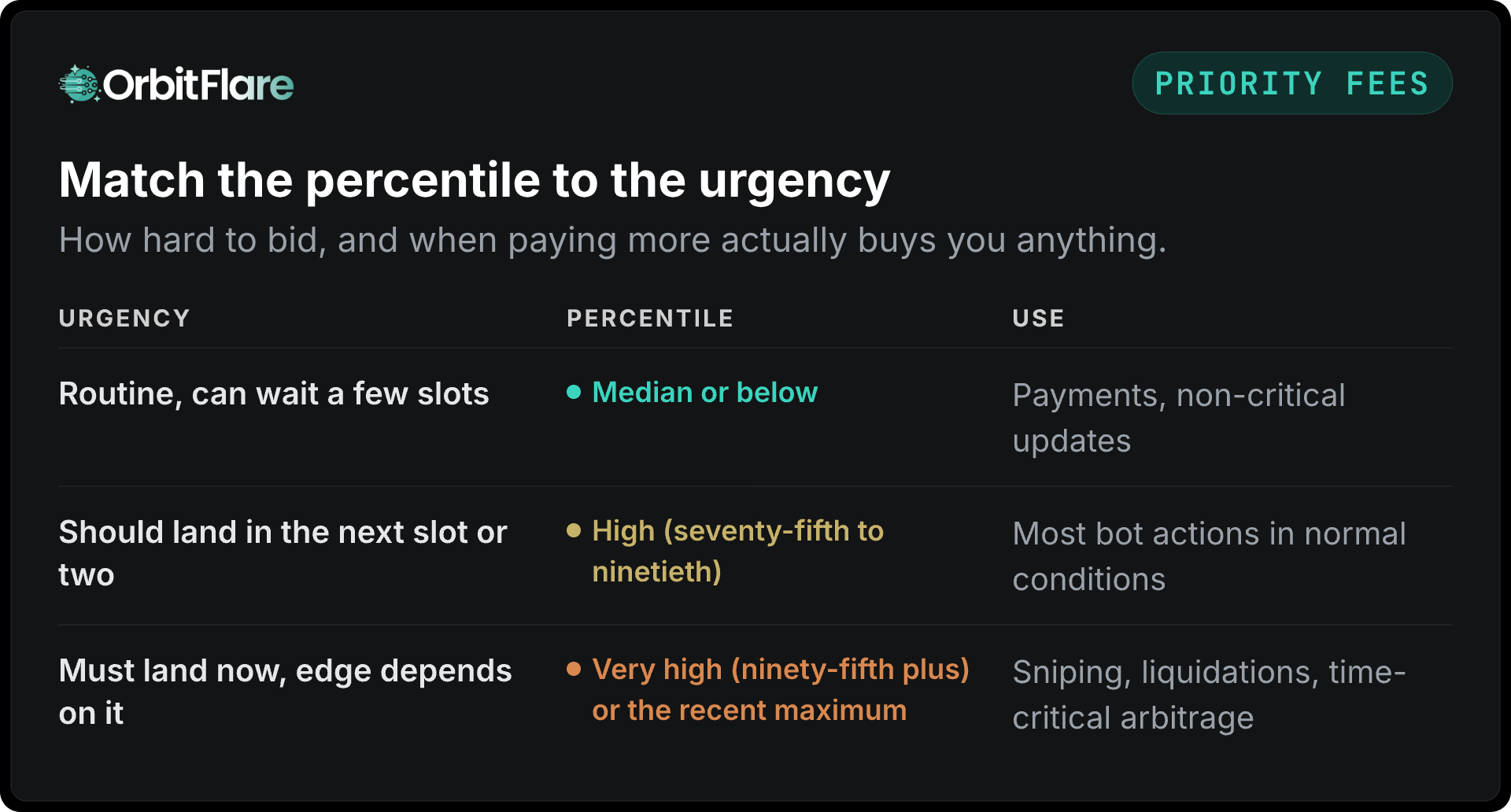
In the case of a launch or a liquidation cascade the distribution rises sharply within a few seconds. Therefore take a sample from a short time window (that is, the last few slots) so that the estimate picks up the spike, and then recalculate right before signing.
Step 4: cap and sanity-check
Work out the highest total fee you are willing to pay for each type of transaction and turn down any request that exceeds this amount. If there is no limit, a contested launch could cause a bot to pay fees that are more than the trade is worth. Additionally, you should check for common sense: if a priority fee is many times the value of the transaction, this is indicative of a bug and not a deliberate strategy.
For each transaction you should record the estimate, the percentile, the cap decision, and the landed fee. These logs are what you use to adjust the percentile for each strategy.
Putting it together
For each transaction:
- Prepare the instructions and determine which accounts can be written to.
- Simulate and set the computing limit at the amount consumed together with a margin.
- Check the most recent prioritisation fees for those accounts over the last few slots.
- Select the percentile that corresponds to the urgency of this transaction.
- Multiply by the limit, then compare the result with the cap, and either make the necessary adjustment or skip it.
- Add the compute budget instructions (limit and price), sign, and then send.
- Write down the estimated fee next to the actual landed fee and note the difference in slots.
For the hot path, keep a warm cache since steps two and three involve network calls: a continuously updated sample of fees for each account set and the compute usage per transaction type, the former being obtained through a subscription rather than by making a call for each transaction.
Mistakes that cost money
- Using the global fee. Some dashboards and certain libraries provide a figure that applies across the network. This is incorrect for any account that is being competed over, and costly when applied to any quiet account.
- Fixed fees. That's acceptable for a moment but wrong for the rest of the day.
- Default compute limits. You will be charged for any compute that you do not use with each transaction.
- Bidding to fix delivery. If the transactions are not reaching the leader (in the case of the unstaked path during congestion), then the fee cannot resolve the issue. The fee orders the transactions that the leader has; a staked submission lane is what gets them to the leader. OrbitFlare Apex is that lane: regional endpoints, leader-directed routing, and visibility into every send. For more information about how to get transactions onto Solana, see our guide at how to land transactions on Solana.
- Confusing fees with Jito tips. The bundles are ranked according to the tips in the block engine auction; although priority fees apply within the bundle they do not determine the auction. For information on how the auction ranks the bundles, see Jito's documentation.
Conclusion
The estimation of the priority fee on Solana involves two components: the compute limit obtained through simulation, and a price per unit derived from the most recent fees associated with the specific accounts you're using, at a percentile level that corresponds to the urgency, with this calculation being redone for each transaction and having a cap. By doing this, you avoid overpaying on accounts that are quiet and start landing on the ones that are being competed over. You should also bear in mind the limit of fees, since they only order what the leader already has, and it is through a staked submission pathway that your transaction gets to the leader when there is network congestion.
The OrbitFlare RPC plans feature the staked path together with the standard fee methods; for more information about where fees fit within the overall system, see the low-latency infrastructure guide.