Transaction V1 activates on Solana mainnet at the next epoch boundary on 10 September 2026. The new version increases the maximum transaction size from 1,232 bytes to 4,096 bytes and adds a new format that cannot be read by the old client libraries.
Only one item on the list causes an error; all others allow code to function with incorrect numbers.
Current status of each change
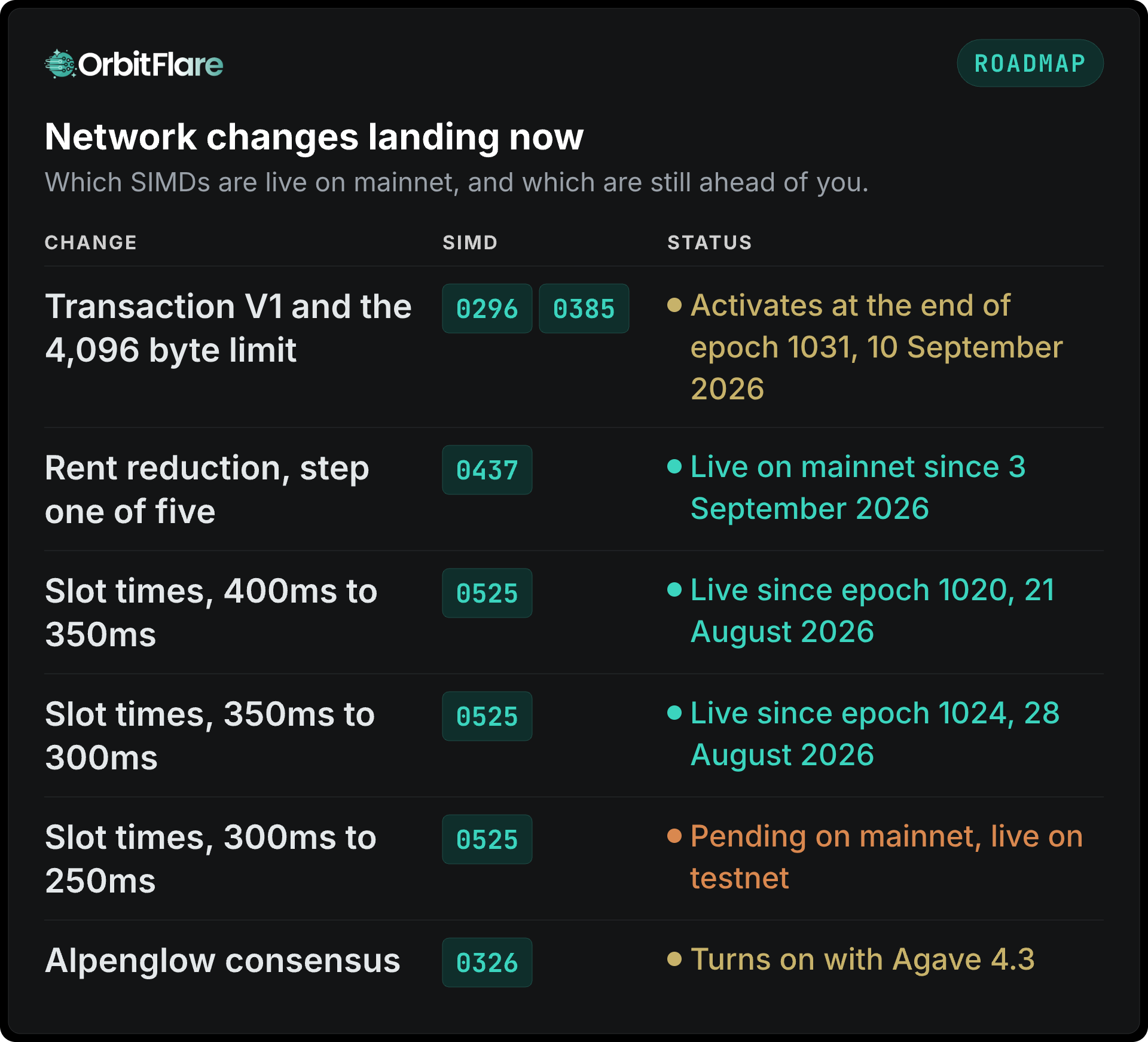 Agave 4.2 was released on 11 August 2026; however, none of the changes have been activated on that date. Every change has its own activation gate, which explains the different dates mentioned above.
1. Require v1 on every call that returns transactions
What fails. Any call that returns transactions and has not been declared compatible with version 1.
How it fails. With an error (the only item causing an error). The error code is -32015. The whole call fails, not just this particular transaction. As a consequence, a single v1 transaction in a block breaks the getBlock call for the whole block.
Where to verify. getBlock, getTransaction, getTransactionsForAddress when transactionDetails is full, and the transactionSubscribe and blockSubscribe WebSocket subscriptions.
Recommended action. Add maxSupportedTransactionVersion: 1 to every relevant endpoint. Update the SDK first and check its ability to read v1 transactions; otherwise, requesting an unsupported version will merely move the error. For TypeScript, use @solana/kit 8.0 or higher, or @solana/web3.js v3. For Rust, use solana-rpc-client-api 4.2 or higher.
2. Read the priority fee from the header
What fails. Any way to estimate the fees by looking for ComputeBudget instruction.
How it fails. Without an error. A v1 transaction doesn't contain a ComputeBudget instruction; any code scanning for it fails to find anything, reports zero, and proceeds further. Thus, every v1 transaction appears to pay zero priority fee.
Reason for change. With v0, validators needed to look through the instruction data to calculate the bid of a transaction, which took time. With v1, the compute budget moves into the header, where the priority fee, the compute unit limit, the account data size limit, and the heap request reside. In case a v1 transaction contains a ComputeBudget instruction, it is simply ignored.
Recommended action. Use the priorityFee property from the transactionConfig object. Watch the units carefully; in legacy and v0 the number meant the price in micro-lamports per compute unit. In v1, it means the total in lamports. Thus, the priorityFee of 50000 corresponds to 50,000 lamports for the whole transaction.
3. Stop assuming updates for every writable account
What fails. Everything that correlates transactions to accounts, performs reconciliation, and counts the number of account updates.
How it fails. Without an error. Agave 4.2 stops writing accounts that a transaction locked for writing but didn't update; thus, those accounts stop emitting updates in getBlock and gRPC and WebSocket streams. Providers deploying the new release start getting approximately 80% fewer events, although depending on the kind of data you monitor.
Recommended action. Consider the absence of the update event as a signal of "unchanged" rather than as an error. The fee payer is the only account that can be assumed updated reliably. Thus, adapt your monitoring code to the situation; you'll start getting a lot fewer update events, even without service failures.
4. Add a new reward type
What fails. Parsers limited to the fixed number of reward types.
How it fails. Without an error. The stake account being deactivated produces a final payout with type DeactivatedStake, which appears together with other types (fee, rent, staking, voting) in getBlock and blockSubscribe rewards. Parsers unaware of the new value simply skip it.
Recommended action. Add DeactivatedStake to the list of accepted reward types. During the update, make sure to log the unknown values, so that you'll start seeing the newly introduced values in logs instead of holes in numeric outputs.
5. Update Token-2022 parsing
What fails. Anything that parses Token-2022 instructions or mint extensions from jsonParsed responses.
How it fails. Some expected fields might be missing, whereas some absent fields might appear.
Changes.
depositConfidentialTransferandwithdrawConfidentialTransferno longer have separatesourceanddestinationfields; there is a singleaccountfield now, since the two were always equal.unwrapLamports,confidentialBurn, permissioned burn, and batch operations are parsed as JSON instead of raw bytes.unwrapLamportshas theamountas a string and it can be omitted if the whole balance is unwrapped.- Mints with unknown extensions no longer return an empty
extensionsarray, but the full correct one, which can have some names unknown before.
Recommended action. Adapt your code to the new account field structure, don't reject extension names you don't know yet, and consider the absence of unwrapLamports amount as the sign of complete unwrap.
6. Stop using the hardcoded slot time
What fails. Anything that relies on 400 ms interval.
How it fails. Slowly accumulates problems: timeouts trigger too soon, estimates of blocks per window go wrong, and calculations of duration based on slot count become wrong.
Recommended action. Mainnet has switched to 350 ms at epoch 1020 (21 August 2026) and to 300 ms at epoch 1024 (28 August). SIMD-0525 reduces the slot time by 50 ms each time, approaching 200 ms. The 250 ms value is currently active on testnet but not on mainnet. Don't hardcode the value; calculate the time either based on block timestamps or configure it so that the future changes would be done via configurations, not new releases.
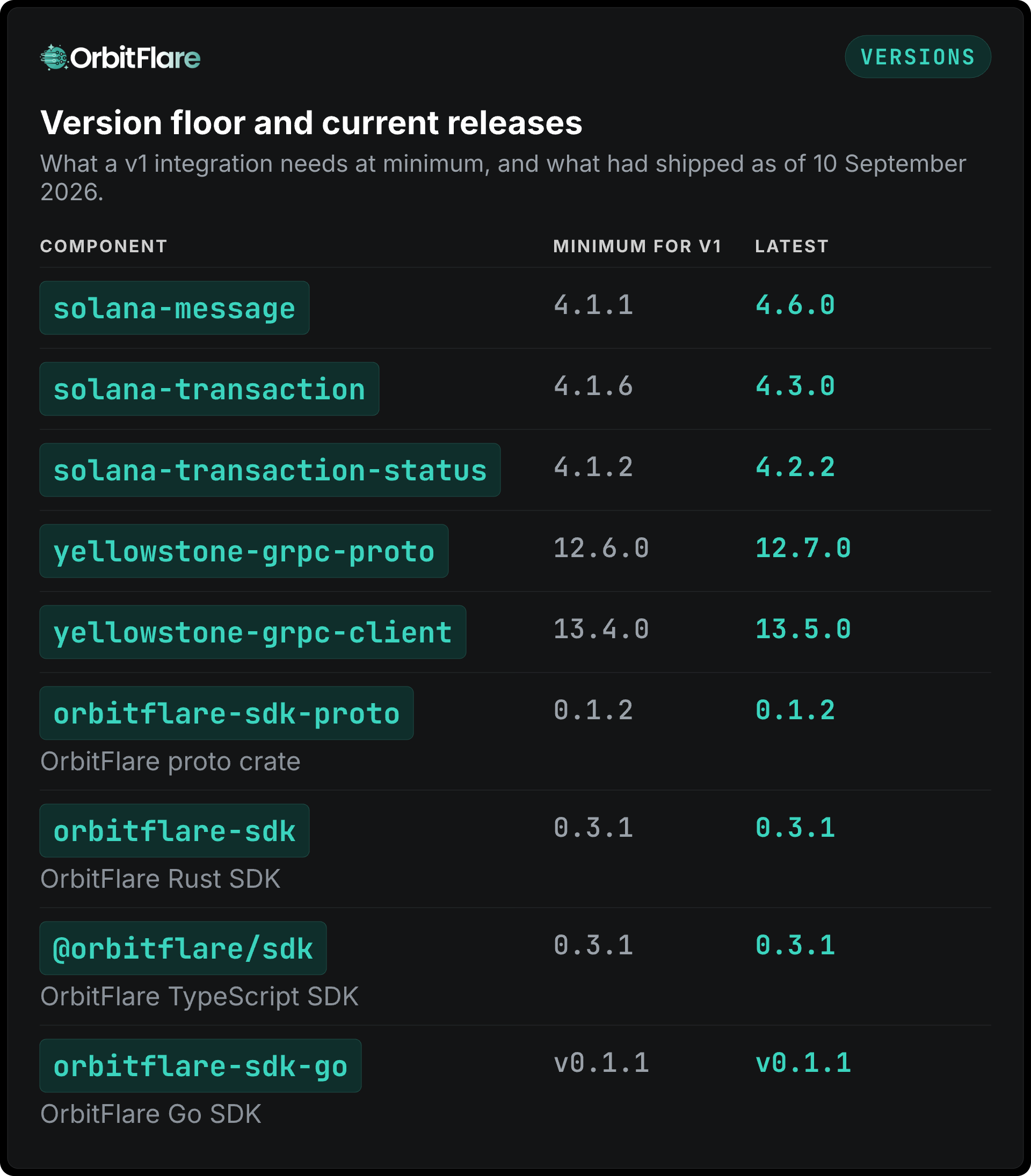
Versions to pin
The minimum version corresponds to the earliest release able to read v1.
 Note:
Note: orbitflare-sdk-proto is an internal dependency of the Rust SDK and is included automatically; direct pinning is only needed if you consume the protos directly.
Go users need to regenerate the protobuf bindings from the current Yellowstone protos and solana-storage-proto, not from an older pinned file.
If decoding transactions manually
If you parse raw transaction bytes, be it the provided decode example, a custom shred decoder, or your own parser, there are three layout changes.
- The version byte is 129 now, allowing distinguishing v1 transactions from legacy and v0.
- Signatures come at the end of the transaction, not at the beginning.
- The compute budget moves from the instructions into the header.
Address lookup tables do not exist in v1; practically, this is fine, because the 4,096-byte limit allows listing the accounts directly.
Conclusion
There are six items to check, with the only one failing definitively. Other five allow normal operation with erroneous measurements.
Do it in the following order: first fix the reading calls (the primary source of errors), then the fee interpretation, then the account and reward parsing, and finally the timing constants.
OrbitFlare's RPC, Yellowstone gRPC, and Jetstream systems deploy the current Agave release in all regions, handling the format changes on the server side. Jetstream sends v1 transactions without requiring subscription change.
Resources
- SIMD-0296: larger transactions
- SIMD-0385: transaction v1
- Agave 4.2 release overview (Solana)
- Reduced slot times (SIMD-0525)
- Reduced rent (SIMD-0437)
- OrbitFlare shredstream decode example
- OrbitFlare Rust SDK: orbitflare-sdk (crates.io)
- OrbitFlare proto crate: orbitflare-sdk-proto (crates.io)
- OrbitFlare TypeScript SDK: @orbitflare/sdk (npm)
- OrbitFlare Go SDK: orbitflare-sdk-go (GitHub)