Each IP on shared plans is limited to 50 active gRPC connections and 50 active WebSocket connections. Such limitations are in addition to the request-per-second limits on your plan. Idle streams will be terminated, so long-lived clients need to have a ping functionality and reconnect loop. The table below highlights the limits and related errors.
Overview of connection limits
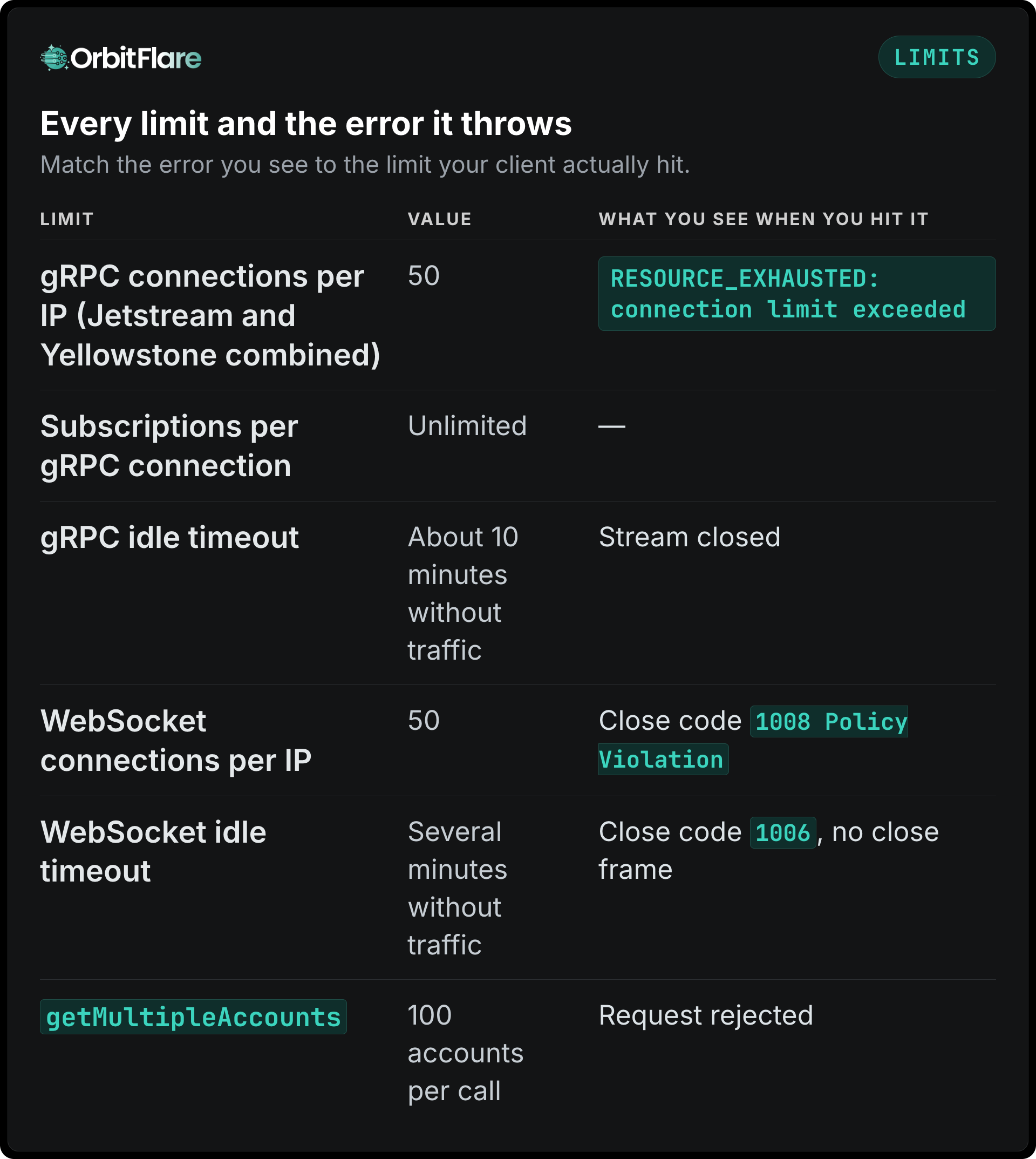
The gRPC limitation is global: it counts all Jetstream and Yellowstone connections from your IP to all regions. So, 30 connections in Frankfurt and 20 in New York make 50 connections.
How to solve the RESOURCE_EXHAUSTED problem
Since a single connection can contain an unlimited number of subscriptions, the solution would nearly always be decreasing the number of connections. Use your account filter, transaction filter, and slot filters within a single stream, not in three different streams. Always close inactive streams before creating new streams and ensure a crash loop is not leaving old connections half-open.
In case a job involves more than 50 streams from a single IP simultaneously, use a dedicated gRPC node that is not limited by the shared connection limit. See dedicated nodes.
Maintaining active streams
All gRPC streams without any activity within ~10 minutes are closed by load balancers and proxies. It might affect a quiet filter like a wallet that has no transactions in recent periods of time. Send pings to your stream periodically; in our documentation example such pings are sent every 30 seconds. All of our SDKs send pings automatically.
As for WebSockets, send a ping frame every 20 to 30 seconds. If you don't do that, then your connection will be disconnected after several minutes with close code 1006.
Reconnection process
Connection problems might arise during deployments, because of latency or because of reaching limits. Please consider the following strategy:
- Exponential backoff: start with a 1 second delay and double after each error up to 30 seconds.
- Continue connecting. Do not give up after a certain number of tries.
- Re-subscribe in each new connection because subscriptions do not persist between connections.
- Close the previous stream gracefully before opening a new one, so you do not count against your own limit.
Still getting disconnected?
Use the gRPC debugging guide or the WebSocket debugging guide. If you are still choosing a transport, see the Solana WebSockets vs gRPC blog post.